
Print And Build Your Own Robot On this page you will find everything you need to know to print and build your robot. Choose Your pib.Model: pib#5pib#4.Advancedpib#5 pib#5 is our latest basic humanoid robot (released 2026), designed as an accessible entry point into humanoid robotics. It is ideal for hobbyists, makers, and educational use in schools and universities. With pib#5, you can build and program your own DIY humanoid robot step by step. The platform is designed for learning and experimentation, while still offering enough flexibility for more advanced robotics projects. The manuals on this site guide you through the complete build process using a pib.Edubox or pib.Makerbox. If you are looking for a more powerful and precise humanoid robot, see pib.Advanced. If you would like to build an older version of pib, you can find the archive here. pib#5 Release Notes ⚡ One plug instead of two supplies 💪 Up to 3× arm torque 🔩 Around 50 fewer screws 🖐️ All-new hands 🧠 Pi 5 with 8 GB 🔊 A voice you can hear better These and other features distinguish the new pib version. Here we have compiled the key changes for pib#5. See the pib#5 Release NotesPrint pib#5 Simply download our free 3D print files for pib#5. Download 3D print files for pib#5This print checklist will help you make sure you have printed all necessary parts to start building pib. Download print checklist for pib#5Build pib#5 With our build instructions pib#5, you easily can build your pib step by step. It’s best to stick to the order, then nothing can go wrong. See building instructions for pib#5pib.Shop for non-printable parts To build a pib, you also need some parts that aren’t printable. We’ve put these parts together for you in boxes. You can find these boxes in our pib.Shop. Visit the pib.ShopBuilding Instructions pib#5 Better together: Our build tutorials are now open for everyone to edit! Found a better trick, an update, or a fix? Join in and help improve our assembly guides for makers worldwide. Step 1: Head & Software Step 1a: Set up pib’s software Manual | Video Step 1b: Build pib’s head Manual | Video Step 1c: Calibrate the motors Manual | Video Step 1d: Build pib’s neck Manual | Video Step 2: Hand & Forearm Step 2a: Build pib’s finger Manual | Video Step 2b: Build pib’s thumb Manual | Video Step 2c: Build pib’s hand Manual | Video Step 2d: Build pib’s forearm Manual | Video Step 3: Upper Body Step 3: Build pib’s upper body Manual | Video Step 4: Shoulder & Elbow Step 4a: Build pib’s shoulder horizontal Manual | Video Step 4b: Build pib’s inner shoulder Manual | Video Step 4c: Build pib’s elbow Manual | Video Helpful Infos & Troubleshooting pib#4 Pi Connect pib#4 Recalibration pib#4 Changing Burned Pins pib#5 Motor Pinout Note: The assembly instructions and the videos are available only in English. pib.Archive pib#4 Released August 2025 3D Print Files pib#4 Printing Checklist pib#4 Building Instructions pib#4 pib#3 Released August 2024 3D Print Files pib#3 Printing Checklist pib#3 Building Instructions pib#3 pib#2 Released August 2023 3D Print Files pib#2 Building Instructions pib#2 pib#4.Advanced pib#4.Advanced is our high-performance humanoid robot platform, designed for advanced makers, research, and professional or academic applications. Building on pib#4, pib#4.Advanced offers greater power, precision, and control, making it suitable for demanding robotics projects and research environments. With up to twice the power in all joints and highly accurate serial motors, pib#4.Advanced enables dynamic movements and repeatable results. Enhanced motor feedback (including torque and temperature data) allows for improved monitoring and control. The motors support recalibration after assembly and can be daisy chained, enabling cleaner wiring and a more efficient build process. pib#4.Advanced is available upon offer as of right now. If you would like an offer for your pib#4.Advanced, just get in touch. pib#5.Advanced – Coming Soon pib#5 in the advanced version is just around the corner. Work on it is already well underway. We’re excited to see what October will bring. You can already pre-order the pib.Box for pib#5.Advanced in our shop. Stay tuned and rock on! Pre-order the pib#5.AdvancedboxPrint pib#4.Advanced Simply download our free 3D print files for pib#4.Advanced and print your robot. Download 3D print files for pib#4.AdvancedThis print checklist will help you make sure you have printed all necessary parts to start building pib.Advanced#4. Download print checklist for pib#4.AdvancedBuild pib#4.Advanced With our building instructions for pib#4.Advanced, you easily can build your own humanoid robot step by step. Quick tip: It’s best to stick to the order, then nothing can go wrong. See building instructions for pib#4.AdvancedWhere to get pib#4.Advanced As of right now, pib#4.Advanced is not yet available in our pib.Shop. To receive a non-binding offer for your pib#4.Advanced, just get in touch! team@pib.rocksBuilding Instructions pib#4.Advanced Step 1: Head & Software Step 1a: Set up pib’s software Step 1b: Build pib’s head Step 1c: Calibrate the motors Step 1d: Build pib’s neck Step 2: Hand & Forearm Step 2a: Build pib’s finger Step 2b: Build pib’s hand Step 2c: Build pib’s forearm Step 3: Upper Body Step 3: Build pib’s upper body Step 4: Shoulder & Elbow Step 4a: Build pib’s shoulder vertical Step 4b: Build pib’s shoulder horizontal Step 4c: Build pib’s elbow Step 5: Final Assembly Step 5: Final Assembly Circuit Schematic Startup & Troubleshooting Startup Initiate Pi Connect Changing Burned Pins Note: The assembly instructions are available only in English. Looking For Something Else? Print Settings: Bill Of Materials (Onshape) You can find printing information directly in Onshape: Go to the pib CAD and log in, click on the icon BOM Table (Bill of Materials) on the right side and check the “Title 1” column. Bill of materials in OnshapeList Of Non-Printable Parts (Onshape) To make building pib easier, you can find a list of all non-printable parts required to build the robot in the Bill of Materials in Onshape. Click on the icon BOM Table (Bill of Materials). If you also check the boxes on the left (show metal parts, electronics, wiring, and tubes), you will see all the non-printable parts. Non-printable parts in OnshapeCommunity And Support (Discord) If you have any questions or need support, feel free to ask our community on Discord! We’re always happy to help. Join us on Discord
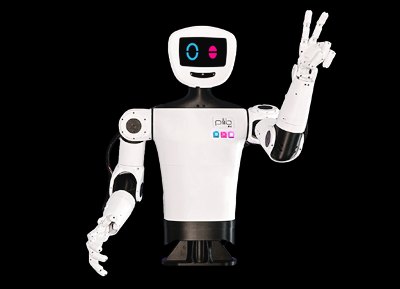
pib#5 is our latest basic humanoid robot (released 2026), designed as an accessible entry point into humanoid robotics. It is ideal for hobbyists, makers, and educational use in schools and universities.
With pib#5, you can build and program your own DIY humanoid robot step by step. The platform is designed for learning and experimentation, while still offering enough flexibility for more advanced robotics projects.
The manuals on this site guide you through the complete build process using a pib.Edubox or pib.Makerbox.
If you are looking for a more powerful and precise humanoid robot, see pib.Advanced.
If you would like to build an older version of pib, you can find the archive here.
⚡ One plug instead of two supplies 💪 Up to 3× arm torque 🔩 Around 50 fewer screws 🖐️ All-new hands 🧠 Pi 5 with 8 GB 🔊 A voice you can hear better
These and other features distinguish the new pib version. Here we have compiled the key changes for pib#5.
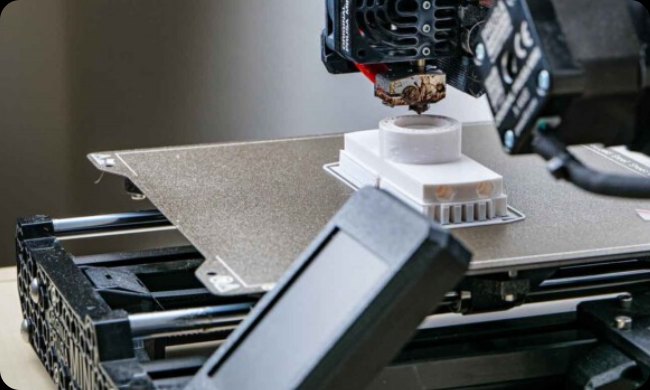
Simply download our free 3D print files for pib#5.
This print checklist will help you make sure you have printed all necessary parts to start building pib.
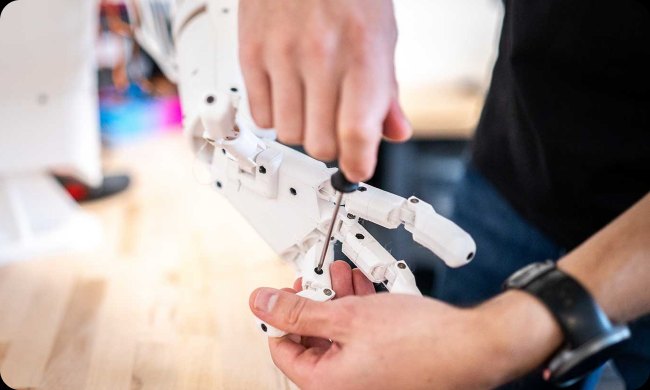
With our build instructions pib#5, you easily can build your pib step by step. It’s best to stick to the order, then nothing can go wrong.
To build a pib, you also need some parts that aren’t printable. We’ve put these parts together for you in boxes. You can find these boxes in our pib.Shop.

资料来源:企业官网公司介绍页面(复核日期:2026-10-08)。